What are the key steps?
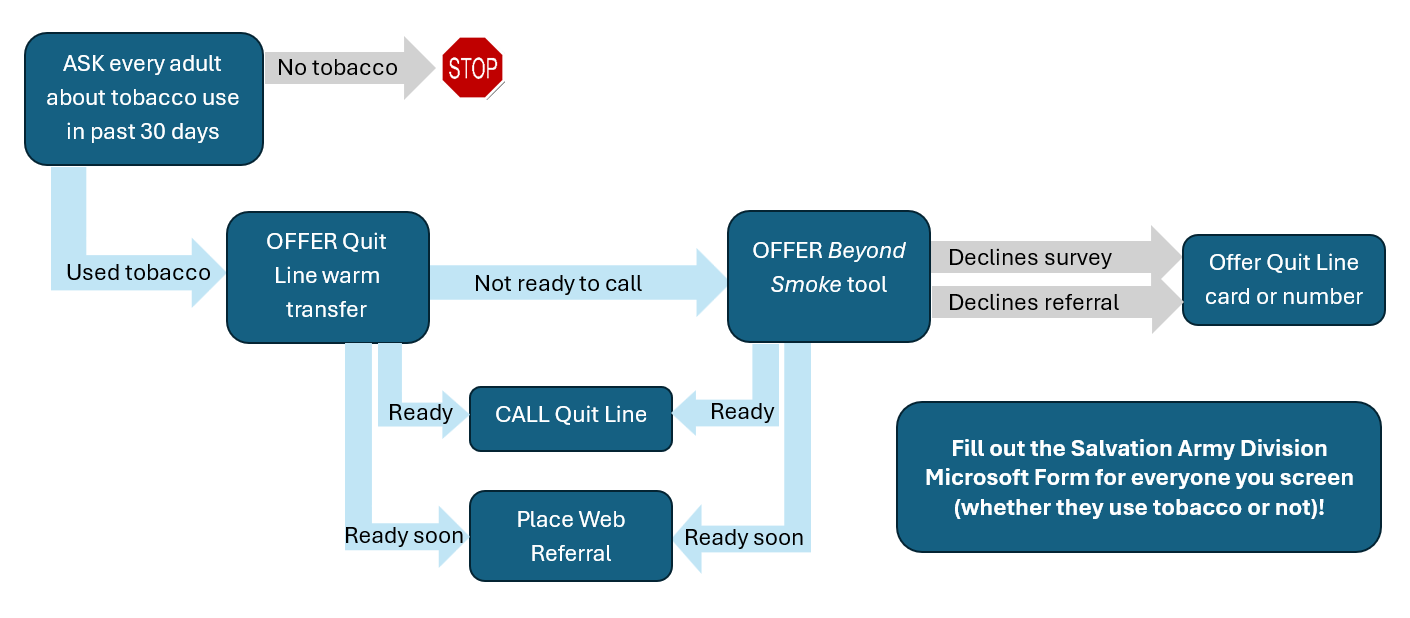
The key steps of the program include:
- Ask participants about tobacco use
- Offer a WTQL connection over the phone or “warm transfer” as first priority
- Offer a WTQL referral via the web to those not ready to call today
- Use the Beyond Smoke tool to overcome participant barriers to treatment
- Report program data to the Salvation Army Division via the Microsoft Form
This flowchart shows how to carry out these steps in order:
Use the below resources to guide each step of the program:
Best practices in tobacco screening (tipsheet)
Role play demonstration of WTQL Warm Transfer procedures (recorded training)
Role play demonstration of WTQL Web Referral procedures (recorded training)
Technical demonstration of WTQL Web Referral submission (recorded training)
Instructions and screenshots about how to submit a web referral to the WTQL (tipsheet)
Access the web referral portal here.
Demonstration of administration of Beyond Smoke tool over the phone
(recorded training)
Access the Beyond Smoke tool in English here. Access the Spanish version here.
Technical demonstration of Salvation Army Microsoft Form submission
(recorded training)
Access the Microsoft Form here.
This one-page screening and referral workflow walks through each key step of the program and provides sample scripting and direct links to all resources and tools.